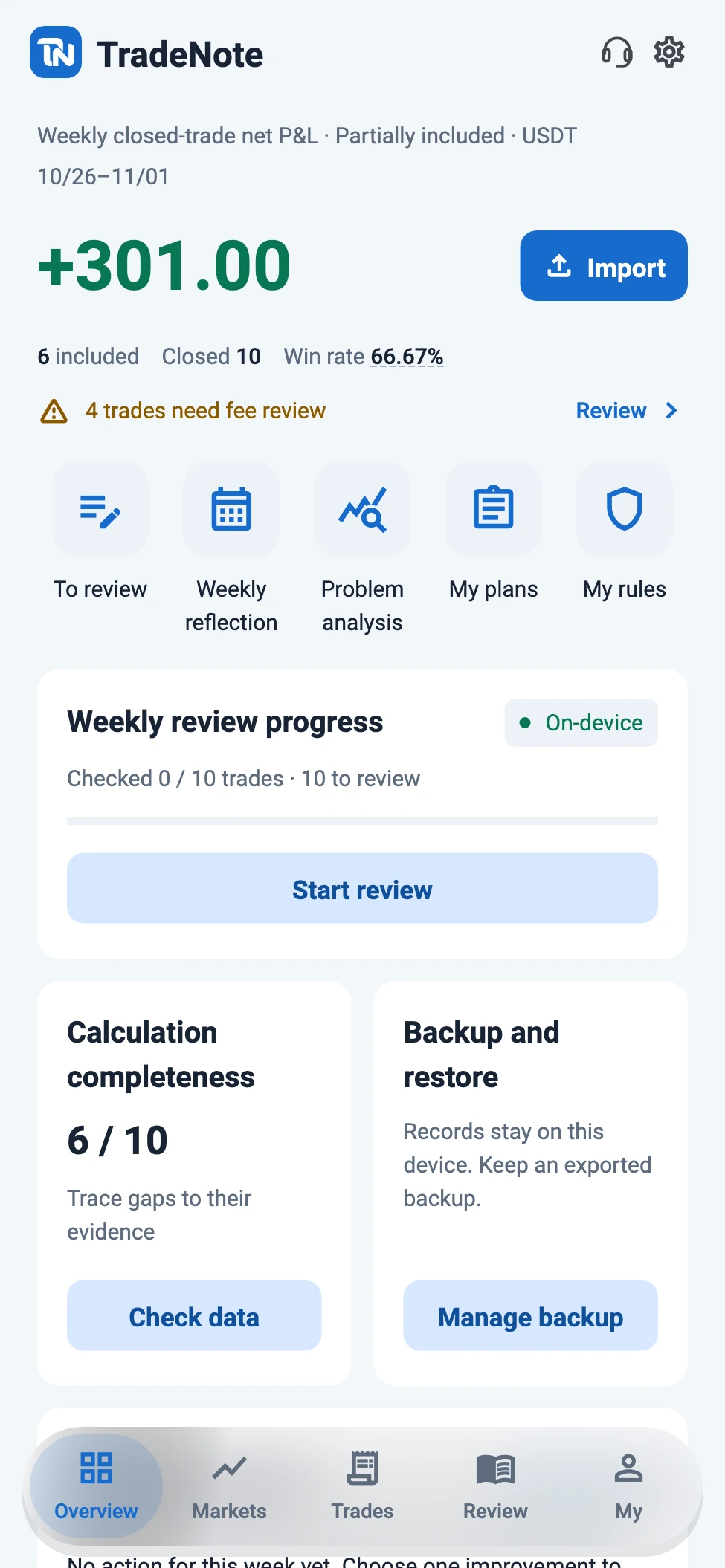
Review imports before posting. Trace returns to their costs and execution to its plan, then choose an action for the next week.
Import. Check. Confirm.
Files and pictures first become drafts to review. Standard CSV, unfamiliar delimited files and image extraction have clear limits. Check source, amounts, fees and times before posting.
Files / trade screenshotsEditable review
Confirm to save
Your result, after costs
Example: +100 USDT realized trading P&L, −8 trading-fee cash flow and −3 funding cash flow give +89 complete net P&L. Unknown fees stay missing; partial coverage is labeled.
For one fictional BTCUSDT trade, plan a pullback entry and write an exit condition before entry. Link rules and the original screenshot; keep edited values separate from source evidence.
Why did I take this trade?
Wait for the retest. Exit on the condition I wrote before entry.
Planned entryExit respected
Profit and process, apart
Check the same trade against its plan and rules: was the exit condition written first, and followed? Evaluate profit and plan adherence separately, with evidence behind each observation.
Profit · followed planProfit · deviatedLoss · followed planLoss · deviated
One change for next week
Save weekly execution observations in a report, preserving your summary and old versions. Choose one action, such as writing exit conditions before entry, and check it next week.
THIS WEEK’S ACTIONWrite my exit condition before entry.Plan first. Verify execution later.
Give the trade context
Browse watchlists and markets, keeping spot and futures distinct. Historical candles, OHLC, landscape charts and related trades add context. Spot quotes do not imply complete spot-trade accounting.
SpotFutures
BTCUSDT82,024.00−0.64%
Quotes and candles are reference data.
Examples illustrate the workflow; they are not performance claims or live quotes.
TradeNote Ai organizes. You review.
TradeNote Ai helps organize evidence and draft weekly reports. Device authorization and the enabled setting must be valid. Image recognition can start after preview confirmation; mapping and reports also retain a preview and confirmation for each send. Check the App confirmation page for scope and service details.
Pictures into reviewable candidates
Confirm the selected image preview first. When TradeNote Ai is enabled and available, recognition starts automatically and can produce several trade candidates. Review them in the inbox; amounts, fees and times still need your check. Nothing is posted automatically.
Map unfamiliar headers
Read UTF-8 CSV, TSV, semicolon and pipe-delimited text. AI fills empty mappings and keeps manual choices. It receives selected headers and type features, not original cells. This is not automatic support for arbitrary Excel, PDF or exchange-native reports.
Draft from a chosen week’s facts
Preview the week’s material, generate a cited draft and choose what to adopt. Keep your summary, old versions and original trades. No open-ended chat, investment advice or trading signals.
Sending scope depends on the task: selected compressed pictures for extraction, selected headers and type features for mapping, and the previewed week’s material for reports. Enabling AI does not automatically upload the whole ledger.
A CLOSER LOOK
A journal you can return to.
Overview → Markets → Trades → Review → My. Images use real 1.0.0 widgets with isolated fictional records. Quotes are synthetic examples, not a live website market feed.
See weekly results with their coverage and missing-fee checks. Organize shortcuts, weekly actions and overview cards.
Real 1.0.0 widgets · Fictional records and synthetic quotes
A SMALL HABIT, EVERY WEEK
From evidence to action.
01
Import, then review
Choose a source and preview files or pictures. Save drafts, preserve originals and explicitly confirm each trade before posting.
02
Check P&L and costs
Separate realized trading P&L, fees and funding. Unknown costs are not zero; complete net returns include only records with complete costs.
03
Compare execution to the plan
Link plans and rules to that trade. Record adherence or deviations without treating profit as proof of good execution.
04
Save a report. Track an action.
Keep a personal summary, optionally adopt a cited TradeNote Ai draft, then choose one action to check next week. Report exports and full backups serve different purposes.
Your ledger, reviews and original pictures stay local by default. Public markets require a connection. TradeNote Ai is optional online assistance, using the previewed scope, enabled setting and sending confirmation. Check the App confirmation page for the sending scope and service details. You export backups yourself.
This website uses visit analytics with page paths and a random session ID. It respects your browser’s Do Not Track and Global Privacy Control settings, and does not read trades, reviews or screenshots stored in the App.
Android 1.0.0 available · iOS not publicly available yet
Binance USDT-perpetual report certification, cross-file reconciliation, amount tracing and backup health checks remain in planning or validation. Arbitrary native reports are not certified. Accounts, cloud sync and S3/API sync are not available.
How is TradeNote different from exchange P&L reports?
TradeNote separates returns from execution. P&L, trading fees and funding have evidence, while plans, rules, observations and reports form a continuous record. Profit does not automatically mean plan adherence; a review should lead to an action you can check.
Which import formats are supported?
Use the standard closed-trade CSV, map UTF-8 CSV/TSV/semicolon/pipe-delimited text, or review image candidates. A source directory is not certification of every exchange-native format. Arbitrary Excel and PDF files cannot be posted directly.
What if funding or fees are missing?
Keep the record for review. Unknown costs are not zero. Complete net returns and win rates use records with complete fees, with partial coverage labeled. Recalculate when costs are known, preserving notes, reports and evidence.
What do markets and online AI send?
Markets request public pairs and candle ranges. TradeNote Ai previews and confirms each task’s scope: compressed pictures, selected headers and type features, or material for the chosen week. Sending scope and service details appear in the App before confirmation. The whole ledger is not sent automatically.
How should I protect a backup?
Export a full backup before changing phones, uninstalling or moving to the new package. Keep it in a trusted place and restore it in the new installation. PDF/CSV report exports are not full ledger backups. Cloud sync and automatic migration are not available.
Who is it for? What can it account for?
USDT-perpetual traders who want to check returns and fees, preserve decision evidence and review execution. Spot and futures quotes are available, but complete trade accounting currently covers USDT perpetuals, not all spot trades or multiple settlement currencies.
Does screenshot AI post trades directly?
No. Recognition requires image preview confirmation and enabled, available AI. The result is a candidate for review. Confirm source, P&L meaning, costs and times, then explicitly post each trade. AI cannot turn an unknown amount into zero.
Which version does the download contain?
The official Android download is 1.0.0. Page examples use that version’s real widgets and fictional data. iOS is not publicly available yet. The new Android package is separate from 0.12.0, so back up and restore your data; it is not inherited automatically.